🇬🇧 English
🇬🇧 English
Тёмная тема
A Telegram bot is one of the most convenient ways to connect a neuroassistant to a business.
Through the bot, you can accept requests, respond to people, conduct mailings, collect statistics, accept payments, and link communication to a CRM or internal system.
This article describes the basic connection process: activate or duplicate the necessary topic in @aiworkersbot, create your own bot in @BotFather, obtain a token, and add it to the NEUROASSISTANTS panel.
A Telegram bot can be a working entry point for customers.
It can:
/lang command;This means that the bot is not just "buttons in Telegram." It is a separate channel through which the neuroassistant can interact with customers and assist the business.
In brief, the path is as follows:
If the bot management opens instead of the authorization window, it means the connection already exists, and the authorization block can be skipped.
In the NEUROASSISTANTS ecosystem, the scenario can be launched through a link in @aiworkersbot.
Example activation link:
After transitioning to Telegram, you need to duplicate the necessary topic in your neuroassistant. This way, the business gets not just an empty bot but an assistant with the chosen logic, which can then be configured for the task.
More on such links: Hiring Neuroassistant Links in Telegram.
Inside the neuroassistant, you need to open the Options 🚦 section and select Bot Management Panel.
There are two possible scenarios:
To create a Telegram bot, you need to open the official Telegram bot:
BotFather is the standard Telegram tool for creating and configuring bots.
In BotFather, you need to press or send the command:
/newbotIn @BotFather, you need to create a new bot and provide it with details.
Usually, Telegram will ask for:
CustomClinic Assistant.bot.customclinic_assistant_bot.After creation, BotFather will issue a token.
The token is the access key to the bot. It should not be published in public access or sent to outsiders.
Tip
BotFather responds in English. If the entrepreneur is uncomfortable reading English text, they can comfortably use a translator. It’s essential to read BotFather’s responses carefully: it suggests what exactly needs to be entered at each step.
After creating the bot, BotFather will show the token string.
It must be copied in full and without extra spaces.
It looks something like a long string with numbers, letters, and symbols.
Important
Do not paste the actual token into public chats, documents, articles, or screenshots. If the token is leaked, it must be reissued in @BotFather.
After obtaining the token, return to the connection panel.
If a direct connection page is needed, it is located here:
https://ai.knopka.click/telegram_bot
Next, you need to:
After that, the Telegram bot connects with the neuroassistant and becomes available for work.
In the panel, you can see operational information about the bot.
For example:
The panel is needed so that the entrepreneur can see not only the fact of connection but also the live operation of the channel.
The bot can accept inquiries from people who came from advertising, a channel, a group, a website, or personal recommendations.
The neuroassistant can clarify the task, collect contact information, understand the client's interest, and pass the data further.
The bot can participate in scenarios where a person:
This builds a path: publication → interest → transition to bot → request → consultation → CRM.
In the Telegram bot, you can enable a mandatory subscription feature.
Link to activate:
Activate Mandatory Subscription
If the user is not subscribed to the specified channel, the bot blocks access to standard commands and features. Instead, it shows an invitation to subscribe and a button-link to the channel.
Subscription checks are performed via the Telegram API when a user contacts the bot. If the person subscribed — access opens. If they unsubscribe later — during the next check, the bot may again restrict access.
More details: Mandatory Subscription.
The Telegram bot can be a payment point.
Possible payment methods:
The specific payment method depends on the task, region, Telegram rules, payment scheme, and technical setup.
For digital products, a particularly convenient scenario is: the bot issues an invoice, accepts payment, and automatically delivers a file, link, text, video, prompt, instruction, or access.
More about Stars: How to Earn Telegram Stars: Info Products, Gifts, and Payment Bot.
The bot can serve as a place for mailings.
For example, a business can send:
For mailings, it’s convenient to use ready-made responses: prepare the message in advance, check the style, add buttons or links, and then send it again.
It’s important to conduct mailings carefully: not to spam, comply with Telegram rules, and provide understandable value to people.
In the Telegram bot, you can use the ready-made responses feature.
Link to launch:
A ready-made response is a pre-prepared message that can be sent repeatedly. This can be text, an image, a file, a video, a sticker, or other Telegram content.
Such a message can include buttons, links, timers, a sequence of messages after some time, auto-translation, trigger commands, and even a cost in Telegram Stars. The message may also have a unique link to use it in scenarios, funnels, mailings, or auto-publication.
More details: Ready-made Responses.
If a CRM is needed, the bot can assist in recording inquiries:
This way, the bot becomes not just a chat but part of the sales and support system.
The Telegram bot can be a convenient point for multilingual communication.
The user can choose or change the language with the command:
/langAfter the command, the language selection opens: the current language and a list of options with flags.
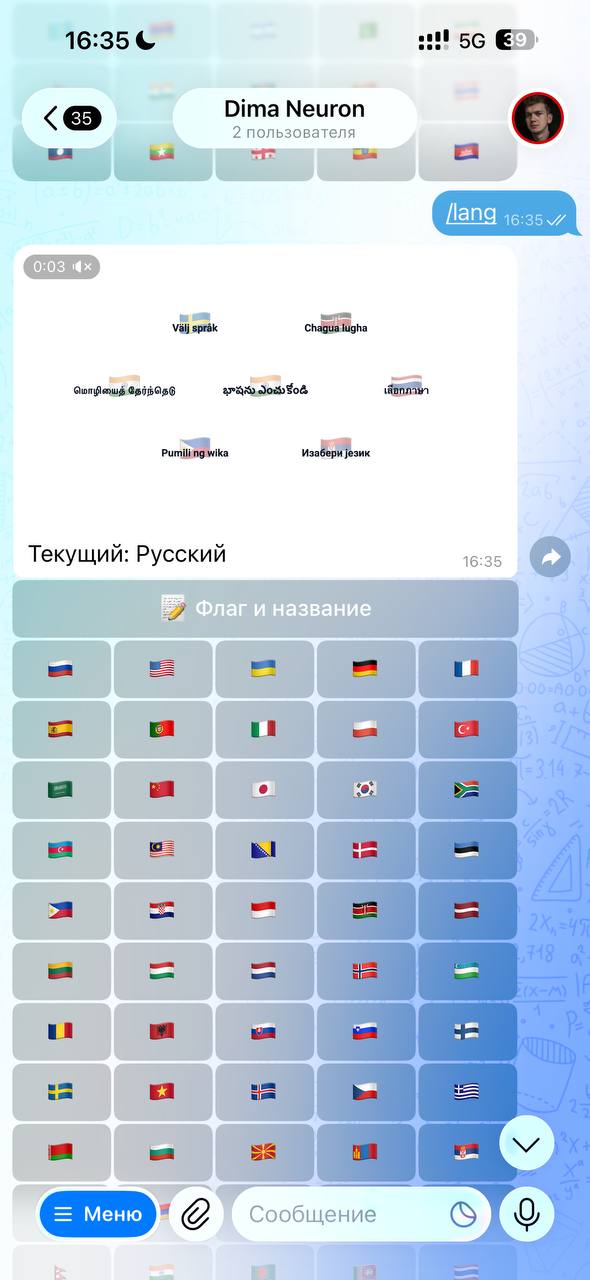
At the same time, language is not just a translation of words. The settings can take into account dialect, communication style, and explanation complexity. For example, one client may need a simple human answer, another — an expert explanation, and a third — a shorter, friendlier delivery.
More details: Multilingual Communication of Neuroassistant.
The entrepreneur connects the Telegram bot once, and then can develop it as a separate channel.
For example:
Before launching, it’s advisable to decide in advance:
/lang;If this is not thought through, the bot will be technically connected, but the business process will remain weak.
Usually yes: it is better for a business to use a separate Telegram bot with its own name, username, and token. This way, the client sees a clear brand, and management does not mix with other projects.
If the bot management opens instead of authorization, then this step can be skipped, and you can work with the current settings.
First, click Check Token, then Restart Bot. Restarting is necessary for the bot to work with the new combination.
Only if they are a responsible person who is actually setting up the bot. The token should not be displayed in public chats, articles, presentations, or screenshots.
The user can send the command /lang and select a language from the list. This is convenient if the bot determined the language incorrectly or the person is more comfortable reading in another language.
More on languages, dialects, and communication style: Multilingual Communication of Neuroassistant.
Under this article, you can gather separate pages with the capabilities of the Telegram bot.
For example:
/lang command;Currently, some of these topics have already been covered in neighboring materials:
A Telegram bot is a form of connecting a neuroassistant to a real business channel.
To connect it, you need to activate or duplicate the necessary topic in @aiworkersbot, create a bot in @BotFather, copy the token, paste it into the connection panel, check the token, and restart the bot.
After that, the bot can be developed as a channel for requests, payments, ready-made responses, mandatory subscriptions, mailings, CRM, multilingual communication, and automatic work with clients.